
This KB describes the steps for configuring failover and high availability for DataStack.
For more information on Omnivex DataStack, see the technical article Omnivex DataStack.
The failover capabilities for DataStack can be configured by the customer’s networking group. The two servers can be set to active/active or active/passive depending on the customer’s preference. A load balancer should be implemented to switch over, in the case of active/passive, in the event of a failure of the primary DataStack server.
Configuration of the load balancer (or 2 load balancers for high availabiliity) is at the customer’s option as long as it allows for the failover to be achieved from one DataStack server to the other DataStack server in the event one server becomes unavailable.
At a high level, the following diagram depicts the use of a load balancer for failover in a DataStack installation.
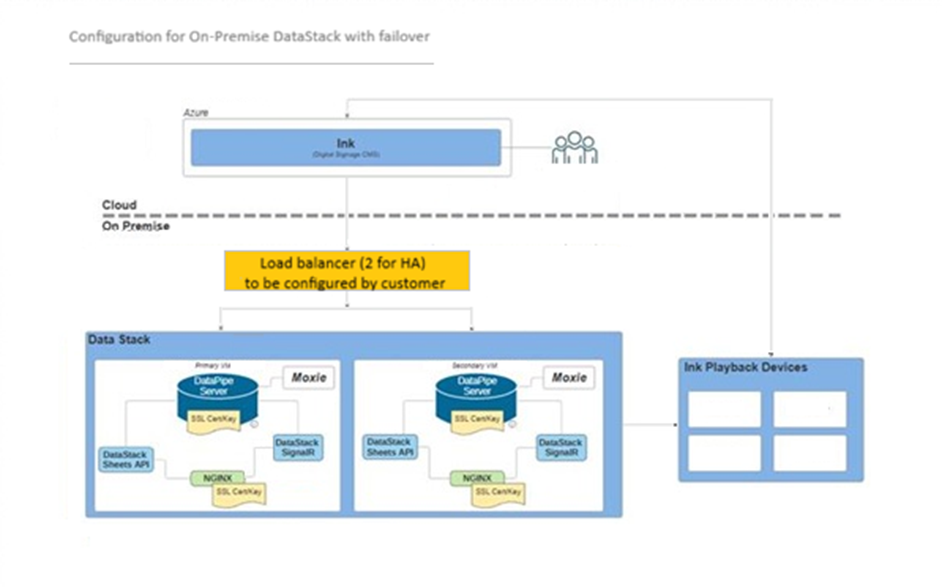
Suggested steps and requirements for failover configurations have been included below. Some customers choose to provide two load balancers for additional security in the event one load balancer fails.
Steps and Requirements for Failover and High Availability Configuration
1. Set up the DataStack instances
Deploy two DataStack instances, each with a unique static IP address. Then choose one of the following SSL configurations:
a. SSL termination at the load balancer (recommended)
- Load balancer handles HTTPS termination; DataStack instances are HTTP endpoints: Client (HTTPS) --> Load Balancer (terminates SSL) --> HTTP --> DataStack.
- Simplifies certificate management — only the load balancer requires a public SSL certificate.
- Nginx configured for HTTP.
b. End-to-end encryption with SSL passthrough
- Load balancer passes HTTPS traffic directly to the DataStack instances: Client (HTTPS) --> Load Balancer (passthrough) --> HTTPS --> DataStack
- Requires CA-signed certificates on each DataStack instance.
- Nginx configured for HTTPS
Note: Certificates must be publicly trusted; self-signed certificates are generally insufficient if working with System-on-chip (SoC) devices.
2. Configure the load balancer
Depending on your SSL choice:
a. Load balancer terminates SSL (for 1a)
- Deploy the load balancer in front of both DataStack instances.
- Configure the load balancer with FQDN and static IP address.
- Install the public SSL certificate on the load balancer.
- Configure traffic forwarding to DataStack HTTP endpoints.
b. SSL passthrough (for 1b)
- Deploy the load balancer in front of both DataStack instances.
- Configure the load balancer with FQDN and static IP address.
- Configure traffic to be passed directly to the DataStack HTTPS endpoints without terminating SSL.
- Ensure each DataStack has a valid CA-signed certificate.
3. Choose the load balancing mode
Configure the load balancer in one of the following modes:
a. Active/passive
- One DataStack instance handles all traffic.
- The load balancer automatically redirects traffic to the secondary instance if the primary becomes unavailable.
b. Active/active
- Both DataStack instances handle traffic concurrently, sharing the load.
4. Configure data sources
Ensure all data sources feed both DataStack instances independently, so failover does not cause data gaps or loss.
5. Configure Ink clients to connect via the load balancer FQDN
When configuring DataStack in Ink, use the load balancer’s FQDN as the connection endpoint for clients.
Additional Notes: Your networking team may use any load balancer or configuration that achieves seamless failover between servers. Verify that health checks or probes are configured so the load balancer can detect when a server becomes unavailable.
An Example of an Active/Passive Load Balancer Set up:
While our recommended setup is to configure SSL termination at the load balancer, we have provided an example of setting up DataStack with an active/passive load balancer using end-to-end encryption with SSL passthrough.
For purposes of this example, Linux was chosen as the operating system of the load balancer. The two third-party products suggested below, HAProxy and Keepalived, serve to provide health checks. Any other products that provide similar functionality can be substituted according to the customer’s preference and computing environment.
1. Set up DataStack instances with end-to-end encryption with SSL passthrough
- Deploy two DataStack instances, each with a unique static IP address.
- Load balancer passes HTTPS traffic directly to the DataStack instances: Client (HTTPS) --> Load Balancer (passthrough) --> HTTPS --> DataStack.
- Requires CA-signed certificates on each DataStack instance.
- Nginx configured for HTTPS.
Note: Certificates must be publicly trusted; self-signed certificates are generally insufficient if working with SoC devices.
2. Configure the load balancers with SSL passthrough
- Deploy the load balancer in front of both DataStack instances. In this example, Linux is being deployed on the VMs.
- Configure the load balancer with FQDN and static IP address.
- Configure traffic to be passed directly to the DataStack HTTPS endpoints without terminating SSL.
- Install HAProxy & Keepalived on each of the Linux load balancer VMs.
- Configure Keepalived to broadcast a Virtual IP address (VIP).
3. Configure the load balancer in active/passive mode
- One DataStack/load balancer instance handles all traffic.
- The load balancer automatically redirects traffic to the secondary instance if the primary becomes unavailable.
- Keepalived conducts health checks on each of the load balancers. If the master load balancer goes down, the backup becomes the master load balancer.
- HAProxy conducts TCP health checks on ports 443 and 14000 on both of the DataStack VMs. If it detects that the master DataStack has issues with any of the health checks, it redirects all traffic to the backup DataStack.
4. Configure data sources
Ensure all data sources feed both DataStack instances independently so failover does not cause data gaps or loss.
5. Configure Ink clients to connect via the load balancer FQDN
When configuring DataStack in Ink, use the load balancer’s FQDN as the connection endpoint for clients.